Delete a project
Deleting a project removes it and its files from your projects. You can't undo it, so download anything you still need first.
The translations the project added to your translation memories stay there unless you choose otherwise. That's usually what you want: the memory is what lets the next project reuse this one's work. If you'd rather those segments went too, you can remove them in the same step.
Delete the project
- Open the project menu:
- in the sidebar, hover over the project and click the ⋮ button next to its name;
- on the Projects page, click the ⋮ button on the project;
- on the project's own page, click the ⋮ button next to the project name.
- Click Delete (on the project's own page, Delete Project).
- Confirm in the dialog.
If a task in the project is still assigned to someone, Taia won't delete it yet and tells you how many assignments are active. Remove the tasks from the project's jobs first, then delete the project.
Also remove its segments from your translation memories
When the project's segments are in translation memories you can edit, the dialog shows an extra option, Also remove this project's segments from translation memories. Under it you'll see how many segments would go and which memories hold them.
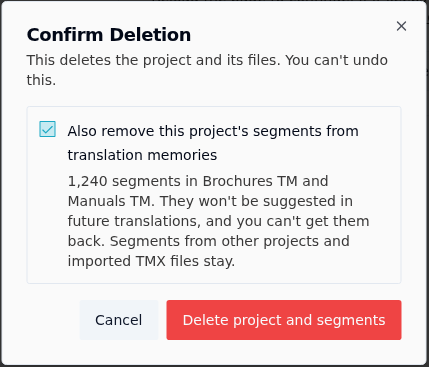
Tick it, and the button changes to Delete project and segments. When you confirm:
- the project's segments are removed from those memories, so they're no longer suggested in the editor or used to guide AI translation;
- segments from other projects stay, and so does anything you imported from a TMX file;
- memories you can use but not edit keep the project's segments.
This can't be undone either. Removing the segments can take a few minutes on a large memory; the project disappears from your list straight away.
The option doesn't appear when there's nothing to remove, for example when the project never added anything to a memory you can edit.
Related
- How translation memory works
- Start a translation memory over, if you want to clear a whole memory rather than one project's segments.