What counts as a reviewed segment
This is the most common surprise in Translation Studio: a reviewer reads every segment, agrees with all of it, closes the editor, and the Progress column still says 12%.
Nothing is broken. Taia has no way to tell reading from skimming, so it does not try. A segment counts as reviewed when you save it, and only then.
Saving is how you approve
There are two ways to save the segment you have selected:
- Press Ctrl+Enter. This saves and moves you to the next segment, which is why it is the shortcut reviewers use all day.
- Click Save on the segment itself. Or press Ctrl+Shift+Enter to save without moving.
Both work whether or not you changed anything, and that is the point.

| What you did | What Taia records |
|---|---|
| Changed the text, then saved | Edited |
| Changed nothing, then saved | Confirmed — approved as-is |
| Opened it, read it, moved on | Nothing |
The third row is the one that catches people out. Opening a segment, clicking into it, scrolling past it, or reading it in Preview all leave no trace. There is no "viewed" state.
It feels redundant to save a translation you did not change. It isn't. That save is your sign-off — it's the difference between "this sentence is correct" and "nobody has looked at this sentence yet", and it's the only signal the person waiting on your review has.
Finding what you have not done
You do not have to hunt for the gaps.
Press Ctrl+U, or click Next unreviewed in the editor footer, and Taia jumps to the next segment you have neither edited nor confirmed. Keep pressing it. When there is nothing left, the editor tells you so: "All segments reviewed! Great work — every segment has been edited or confirmed."
That message, not the Progress bar, is the cleanest way to know you are finished.
The editor footer keeps count as you go. Its bar is measured in words (on older projects without word counts, in segments), while the icons beside it count segments: the page-and-number pair is segments you have edited out of all of them, and the tick is segments you have confirmed. So the footer's percentage can differ from the project page's Progress column, which counts segments only.

What the Progress number actually is
On the project page, each task row has a Progress column showing a bar and a count, like 184/340 (54%).
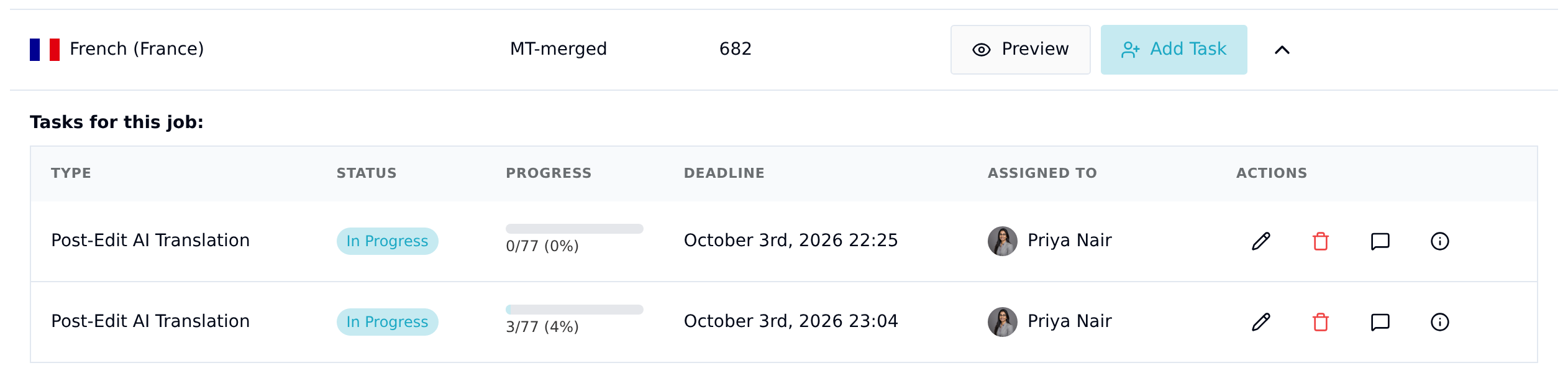
It is a plain fraction:
segments you have saved on this task ÷ every segment in the job
Both edited and confirmed segments count toward it. So does anything else that wrote to a segment on your behalf: auto-propagation across repeated segments, and a bulk Find & Replace.
Locked segments count as done. Unless you've been given unlock rights, you can't edit or confirm a segment that's locked, so Taia doesn't wait for you to: a job with locked segments still reaches 100% once you've saved everything else. The editor footer counts them the same way.
100% means every segment in the job has been saved or is locked. Nothing else means anything in particular.
Running Find & Replace across a job saves every segment it touches, and those segments count. It is a fast way to make the percentage jump without anyone having read the text, so if you use it, don't treat the resulting number as a measure of review coverage. Ctrl+U still walks you through what a human hasn't looked at.
It is not a status ladder
It is worth saying plainly, because the other reading is the intuitive one: the percentage is not a set of stages. 25% does not mean "accepted", 75% does not mean "submitted", and 50% does not mean the task is halfway through some approval process. There is no ladder. It is a count of segments.
Where the work actually stands is the Status column next to it, which tracks the task, and the assignment status (Awaiting Response, Accepted, Submitted) which tracks the person. Those are separate from the percentage and always have been. See how Translation Studio work moves.
A low percentage is a question, not a verdict
Because saving is manual, a reviewer who genuinely finished can still show 60% if they only saved the segments they changed. That is a habit problem, not a quality problem, and it is worth settling with your team before a review starts rather than after.
If you are running the review, the fix is one sentence to your reviewers: save every segment, including the ones you agree with. Then the number means what it looks like it means.