Translate repeated segments once
Most real documents repeat themselves. Safety warnings, table headers, copyright lines, and button labels come back again and again, sometimes dozens of times in one file.
Auto-propagate means you translate each of those once. When you save, Taia copies your translation to every segment in the job with identical source text.
Turn it on or off
Open the ⋮ menu next to the job name and use Auto-propagate identical.

It is on by default, and your choice is saved to your Taia account rather than to the browser. Switch it off on your laptop and it stays off when you next open a job at your desk.
What counts as identical
The source text has to match exactly, including any inline formatting.
That last part is worth knowing, because it explains the occasional segment that looks like a repeat but does not fill in. If one occurrence has a full stop inside a bold tag and another has it as plain text, the two are not treated as the same segment. Copying the translation across would move formatting onto text that has nowhere to put it, and that breaks the layout of the delivered file. Translate those separately.
What happens when you save
Translate any repeated segment and save it with Ctrl+Enter. Your translation is copied to the other occurrences, and a short message tells you how many segments were filled in.
Two things this covers that are easy to miss:
- The whole job, not the visible page. Occurrences on pages you have not scrolled to yet are updated too.
- Only segments that are safe to fill. Empty segments and machine translation get overwritten. Locked segments never do.
Propagated segments are marked in the grid with a dashed border and a small Auto label, so you can always tell which translations you typed and which arrived by propagation. They still need your review and confirmation like any other segment.
When a repeat is already translated differently
Sometimes an occurrence has been deliberately worded differently, and overwriting it would throw away real work. Taia does not do that silently.
If a repeat already holds a different translation that a person wrote, it is left alone and listed for you:
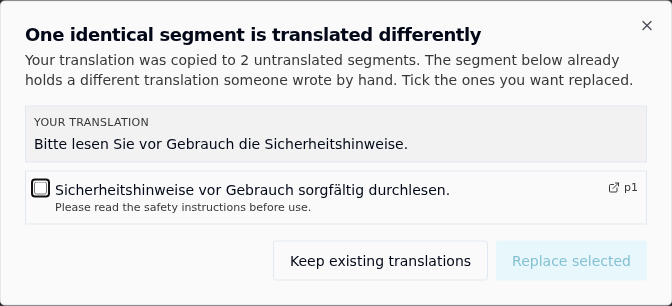
Nothing is ticked when the dialog opens. Tick only the segments you want replaced and choose Replace selected, or choose Keep existing translations to leave all of them as they are. Closing the dialog changes nothing.
The safe outcome is the one you get by doing nothing, so there is no way to lose a colleague's wording by dismissing this too quickly.
Machine translation and earlier propagations are not treated as conflicts. Only a translation somebody wrote or edited by hand will stop and ask.
See the repetition in a job
When you open a job containing repeated text, Taia tells you once how much of it there is.

For the full picture, open the Identical segments panel from the sidebar.
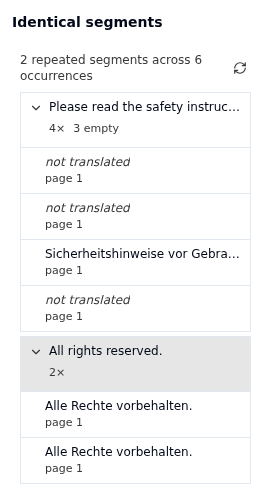
Each repeated segment is one group, showing how many times it occurs and how many of those are still untranslated. Expand a group to see every occurrence, and click any of them to jump straight to that segment in the grid, even if it sits on a page that has not loaded yet.
Groups where the same source is currently translated more than one way are flagged with a warning and sorted to the top. That is usually worth a look: either one wording is wrong, or the occurrences genuinely need to differ.